
Publish Your AI Guides Anywhere
Build guides in GuideAnts Notebooks, then deploy them as embeddable chat widgets on your website, customer portal, or application - no backend AI code required.

From Internal Tool to Customer-Facing Product
Publishing transforms your guides from internal team resources into externally accessible AI assistants. Share your expertise with customers, partners, or the public through embeddable chat widgets or standalone web pages.
Embed Anywhere
Add AI-powered chat to your website, customer portal, documentation, or internal tools with a single web component.
No Backend Required
Design and refine your guide in GuideAnts Notebooks, then deploy it anywhere - without writing backend AI code.
Full Control
Protect your guides with API key or webhook authentication, set usage limits, and monitor analytics in real time.
Framework Agnostic
Works with React, Angular, Vue, or vanilla JavaScript. Full TypeScript support included.
Quick Start
Install the package and embed your published guide in minutes:
npm install guideants<script type="module">
import 'guideants/dist/guideants-chat.es.js';
</script>
<guideants-chat pub-id="your-published-guide-id"></guideants-chat>That’s it. Your guide is now live on your site.
Powerful Customization
The <guideants-chat> component adapts to your needs:
| Feature | Description |
|---|---|
| Display Modes | Full conversation history or last-turn-only for minimal widgets |
| Command Mode | Stateless mode where each message starts a fresh conversation |
| Conversation Starters | Show suggested questions to help users get started |
| File Attachments | Allow users to upload images and documents |
| Voice Input | Speech-to-text with automatic silence detection |
| Camera Capture | Capture still images directly from device camera |
| Collapsible Widget | Floating chat that expands and collapses |
| Custom Theming | Style with CSS custom properties to match your brand |
Client-Side Tool Calling
Published guides can execute tools directly in the browser, enabling interactive features like DOM manipulation, local storage access, and deep integration with your application.
const chat = document.querySelector('guideants-chat');

chat.registerTool('SetTheme', async (call) => {
  const args = JSON.parse(call.function.arguments || '{}');
  document.body.setAttribute('data-theme', args.theme);

  return {
    toolCallId: call.id,
    name: 'SetTheme',
    content: JSON.stringify({ status: 'ok', appliedTheme: args.theme })
  };
});
Your guide can now change the page theme, read user preferences, or interact with any part of your application.
See It in Action
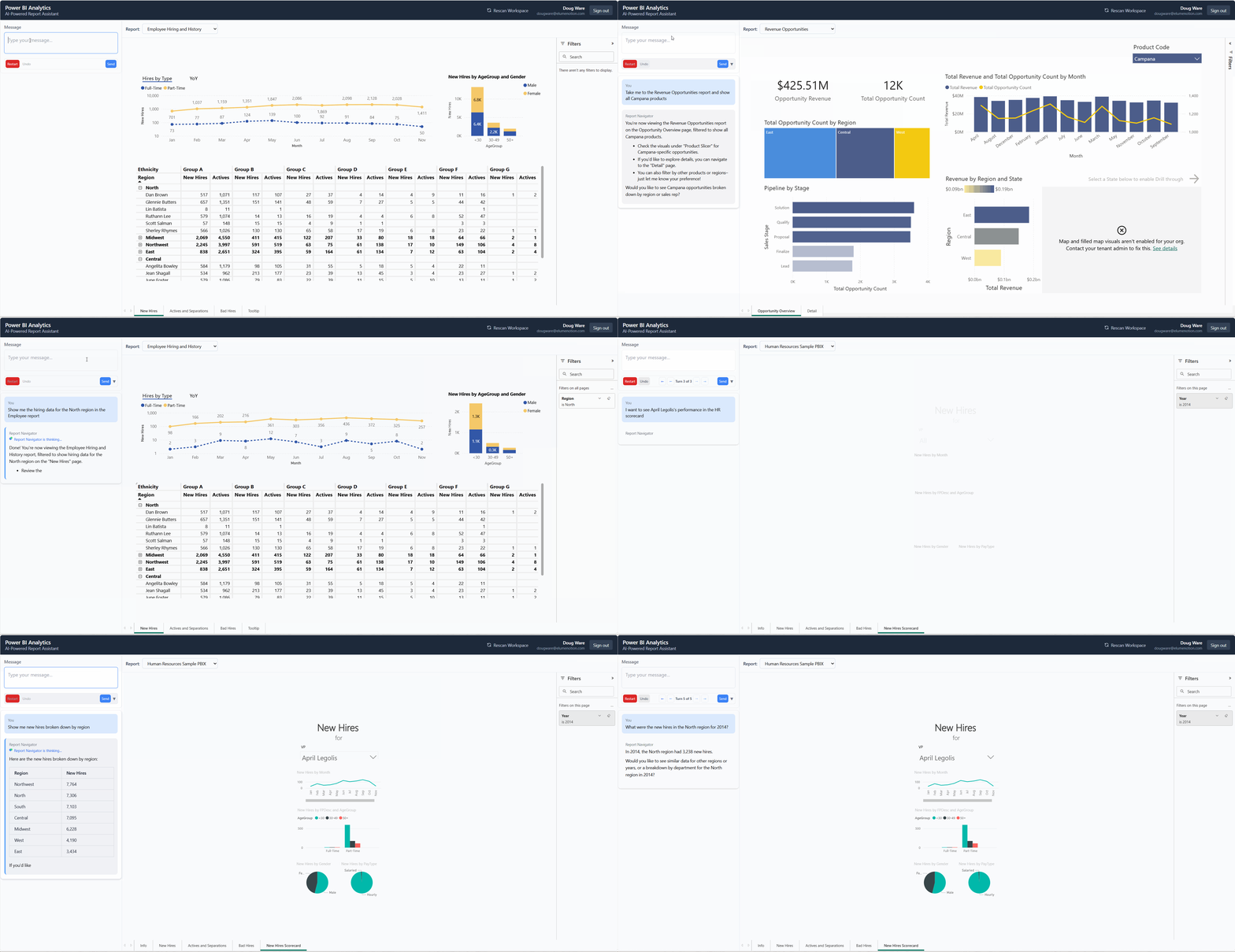
In this demo, a published guide is embedded in a Power BI reporting application. Instead of manually setting filters and navigating between reports, users simply ask questions in natural language. The guide uses client-side tool calling to navigate views, apply filters, and retrieve data - transforming complex report exploration into a conversation.
Context Providers
Inject dynamic context into conversations based on your application state:
chat.setContextProvider(() => {
  return `Current page: ${window.location.pathname}
User plan: ${getCurrentUserPlan()}
Cart items: ${getCartItemCount()}`;
});
Context is captured when a conversation starts, enabling your guide to provide personalized, context-aware responses.
Security & Authentication
Choose the authentication method that fits your needs:
API Key Authentication
Simple and effective for server-to-server integrations:
- Generate keys in the GuideAnts dashboard
- Pass via
x-guideants-apikeyheader - Regenerate or revoke keys anytime
Webhook Authentication
Integrate with your existing auth system:
- Validate tokens against your own backend
- Return user identity for personalized experiences
- Full control over access decisions
Server-Side Proxy
Keep API keys secure on your server:
import express from 'express';
import { createExpressProxy } from 'guideants/proxy/express';

const app = express();

app.use('/api/chat', myAuthMiddleware);
app.use('/api/chat', createExpressProxy({
  apiKey: process.env.GUIDEANTS_API_KEY,
}));
Usage Controls
Protect your resources with configurable limits:
- Message Length Limits - Cap the characters per user message
- Conversation Turn Limits - End conversations after a set number of exchanges
- Retention Periods - Automatically archive old conversations
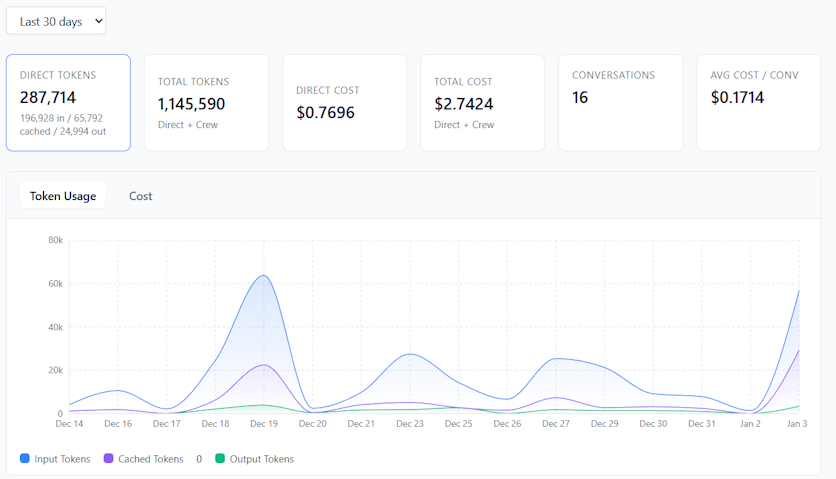
- Real-Time Analytics - Track tokens, costs, and usage patterns per published guide
Use Cases
Customer Support
Deploy AI-powered support that knows your products, policies, and procedures - available 24/7.
Interactive Documentation
Let users ask questions about your docs and get instant, accurate answers with citations.
Product Onboarding
Guide new users through setup and configuration with an AI assistant that understands your product.
Internal Tools
Embed specialized assistants into admin dashboards, CRMs, or operational tools.
Component Features
- Streaming Responses - Real-time token streaming via Server-Sent Events
- Markdown Rendering - Rich markdown with syntax highlighting
- Mermaid Diagrams - Automatic diagram rendering
- Media Support - Images, videos, and audio playback
- Undo & Restart - Users can undo messages or restart conversations
- Turn Navigation - Browse through conversation history
- Accessibility - Built with accessibility in mind
- Responsive Design - Adapts to container size automatically
Ready to Publish?
- Create and refine your guide in GuideAnts Notebooks
- Click Publish and configure your settings
- Copy the Published Guide ID
- Embed the
<guideants-chat>component on your site